For synth, groovebox & keys players · Mac

Turn your jams into loops.

Record a jam, get loops in a minute. Drop in a long, freeform recording. TidyLoop finds the tempo, key, chords and notes, ranks the tightest 1, 2, 4 and 8-bar loops, and exports them as WAV + MIDI for any DAW.

20-minute jamto8 tagged loops in under a minute

Mac app coming soonPay once. No subscription.

For Macs with Apple Silicon (M1 or later). A built-in demo jam shows it working before you record your own.

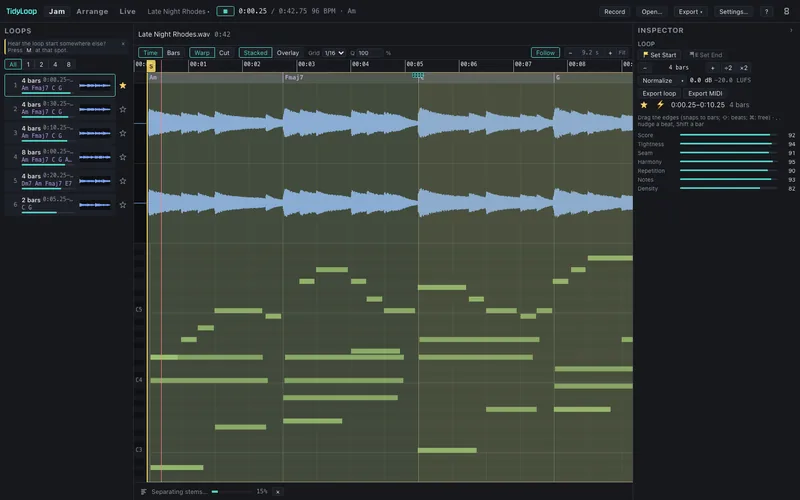
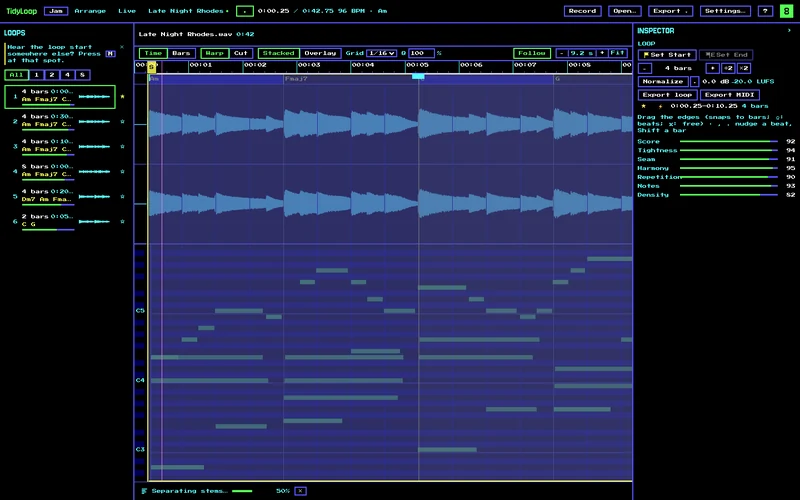
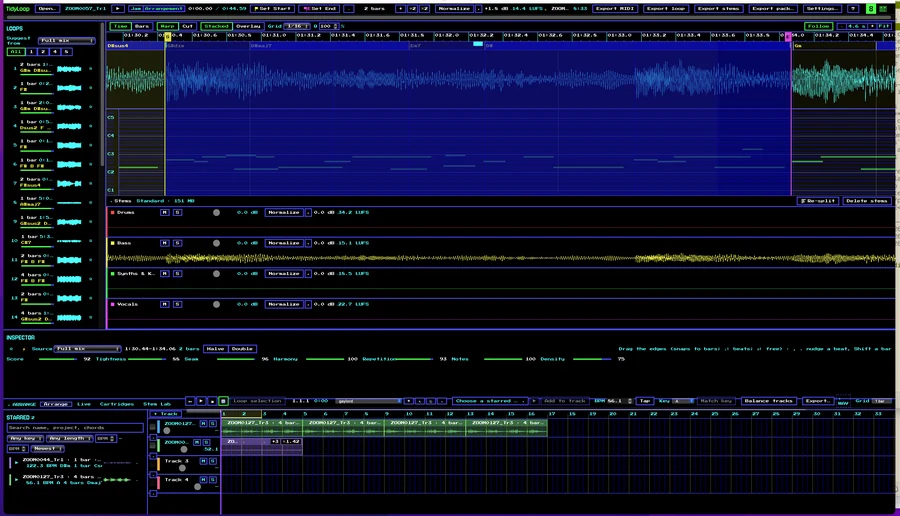
TidyLoop in 8-bit mode with a real jam loaded: ranked loop suggestions on the left, chords over the waveform, the transcribed piano roll, four stems and the arranger.
A real jam in TidyLoop's 8-bit mode: ranked loops, chords over the waveform, the piano roll, four stems and the arranger.

The problem

The good four bars are buried in twenty minutes.

You hit record and jam on the Elektron, the OP-1, the MPC, the Move, the modular or the piano. Somewhere in there is a great loop. Getting it out means scrubbing by ear, guessing the tempo, cutting by hand in a DAW, and re-recording to fix one wrong note.

Most jams never become anything. TidyLoop finds the good bits for you.

How it works

Jam in. Loops out.

  1. Drop in a jam

    WAV, AIFF, FLAC or MP3 from any hardware, recorder or DAW.

  2. It reads the music

    TidyLoop finds the tempo, beat grid, key, chords and notes.

  3. Pick from ranked loops

    The tightest 1, 2, 4 and 8-bar loops, scored and ready to preview.

  4. Export WAV + MIDI

    Named with tempo and key, ready for any DAW.

e.g. jam-03_loop2_120bpm_Am.wav + .mid

Features

Everything between the jam and the DAW.

Not a DAW, and not a full note editor. A loop-mining tool for hardware and keys jammers, with three pages, one per job: Jam, Arrange and Live.

Jam

Find the loops

  • Ranked 1, 2, 4 and 8-bar loop suggestions, scored for rhythmic tightness, harmonic resolution and a clean loop point
  • Tempo, beat grid, key and chord detection, with chords on a lane over the waveform
  • Gapless loop preview: you hear exactly what you'll export
  • Drag the loop start and end; edges snap to beats and zero crossings
  • Star the loops you like into a library (the Starred pool)
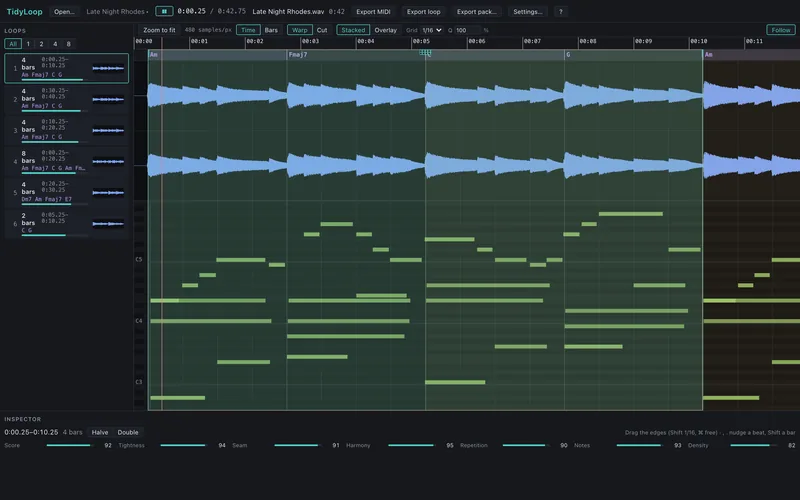
Ranked loop suggestions listed on the left with bar length, time and chords; the selected 4-bar loop is highlighted over the waveform and piano roll, with its scores below.

Export

Export in one go

  • A loop exports as WAV + MIDI together, named with tempo and key
  • Batch export the top loops in one pass, or export a pack
  • Drag a loop straight from TidyLoop into your DAW
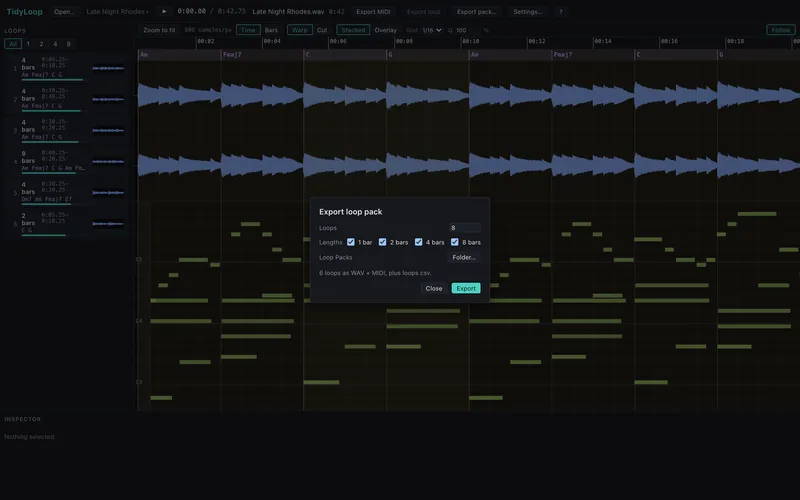
The Export loop pack dialog: number of loops, 1, 2, 4 and 8-bar lengths ticked, and a note that loops export as WAV + MIDI.

Edit

Fix the wrong note

  • Polyphonic audio → MIDI: the transcribed notes show as a piano roll over the waveform
  • Drag a note up or down to re-pitch that slice of the audio. MIDI and audio move together
  • Warp the timing: drag a note earlier or later and the audio around it stretches to follow
  • Full undo. Save projects and come back later
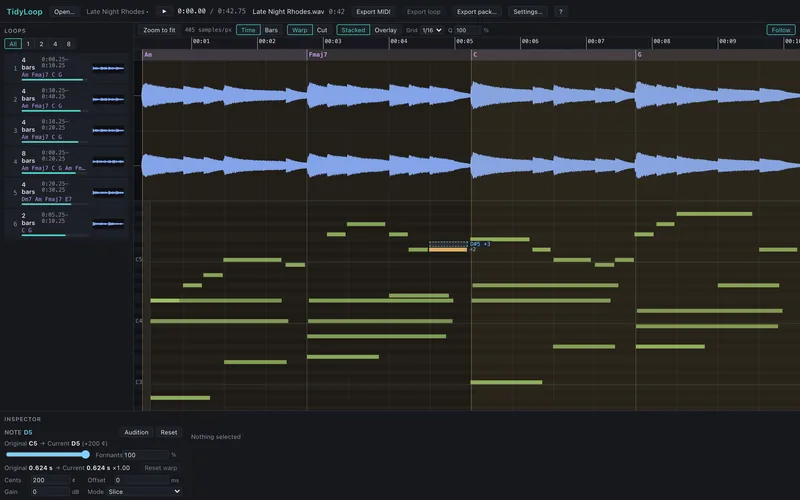
A note being dragged to a new pitch in the piano roll over the waveform.
Drag a note to re-pitch that slice of audio.
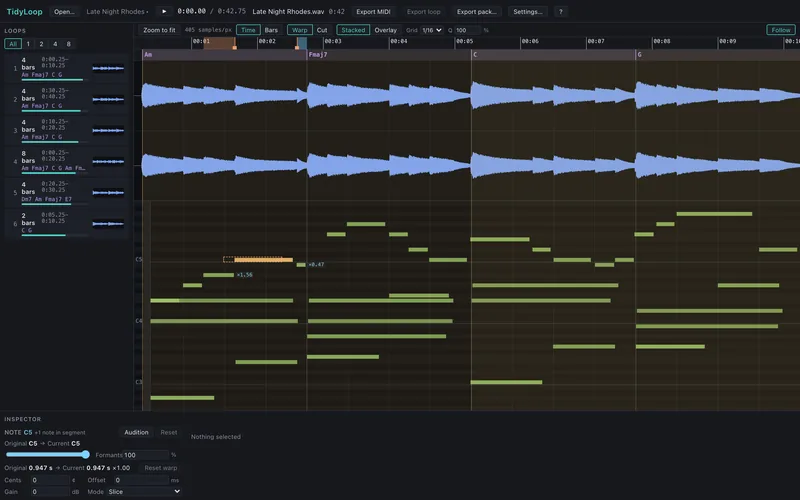
A note being moved in time, with the surrounding audio stretching to follow.
Move a note in time and the audio follows.

Stems

Split into stems

  • Separate a jam into stems on your own computer, with one of two stem models
  • Mute, solo and balance stems; find, export and drag loops from any one stem
  • Analysis reads beats from the drums and notes from the bass and synths, for a cleaner transcription
  • New jams split into stems on their own, so the stems are ready when you need them

HTDemucs

An optional one-time download.

DrumsBassSynths & KeysVocals

TidyLoop stem model

A second option, with its own split.

DrumsBassChordsLead

Arrange

Arrange

  • An arranger: drag starred loops onto tracks to build a track
  • Match & Morph: match loops to a key and tempo feel and line up their downbeats
  • Export the arrangement
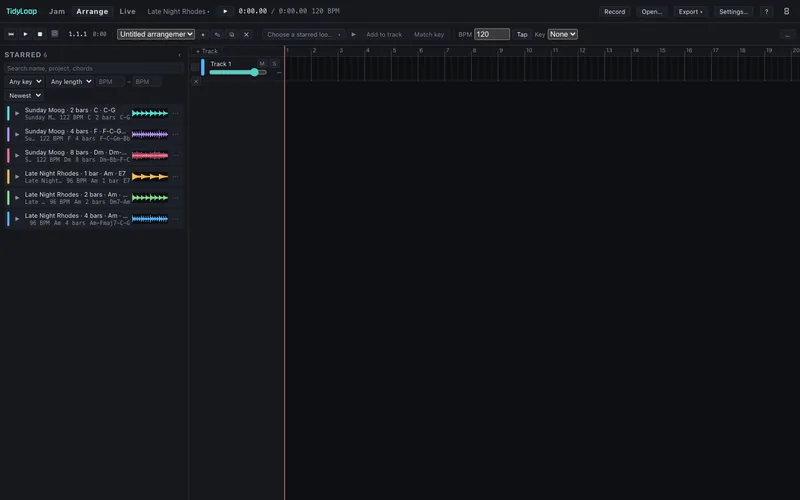
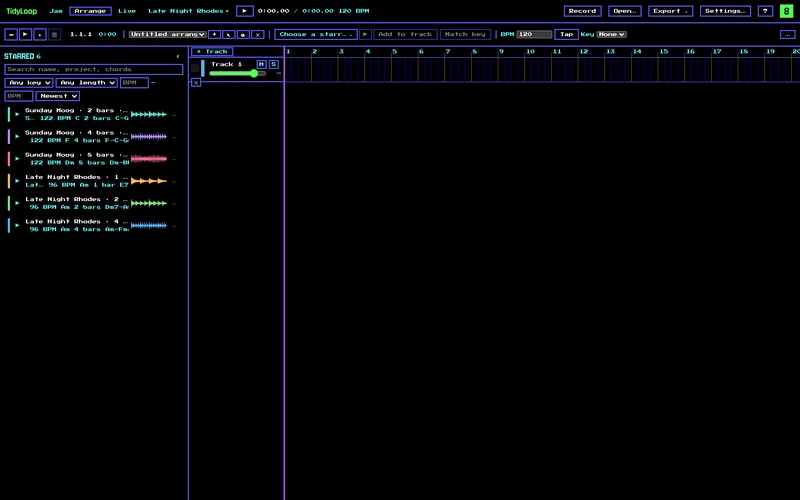
The Arrange page: starred loops on the left dragged onto tracks in a timeline. The Arrange page in 8-bit mode.

Live

Play it live

  • A Live grid of 8 lanes × 8 banks: launch starred loops, always in time, with mouse or keyboard
  • TidyLoop sorts loops into lanes for you: drums, bass, keys, lead, pads
  • Morph from one set of loops to another (Blend, Swap, Filter, Cut), by hand or automatically
  • Record a live performance straight into the arranger
  • Cartridges: plug-in instruments inside TidyLoop. The first, RoboVox, is a robot vocoder that counts, sings your melody or robotises your voice
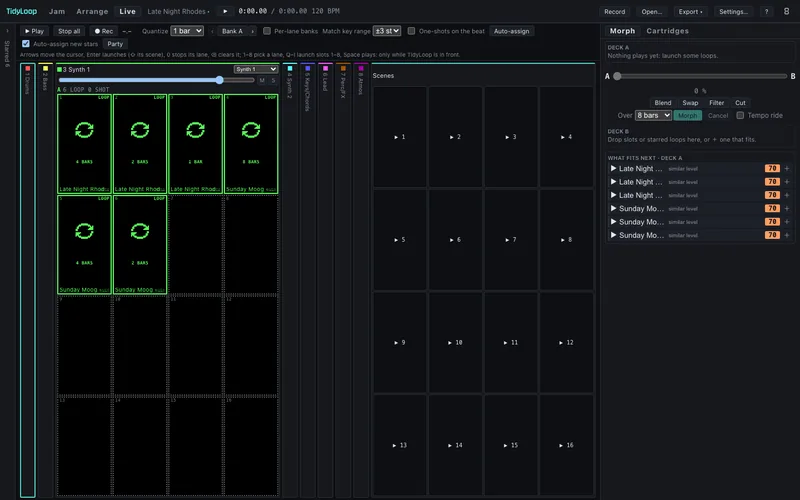
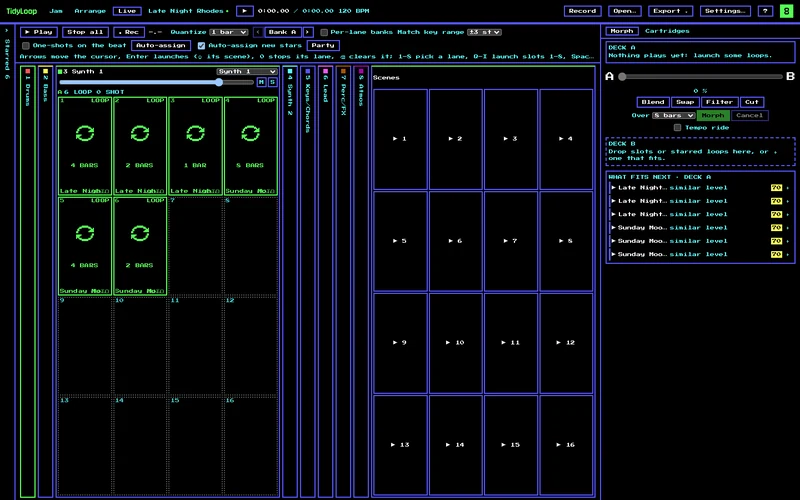
The Live page: a grid of loop slots in lanes, scenes, and the Morph panel with Blend, Swap, Filter and Cut. The Live page in 8-bit mode.

Hardware · direct download only

Maschine MK3 & Box mode

  • TidyLoop takes over a Native Instruments Maschine MK3: pads, LEDs and both colour screens
  • Find, star and launch loops, morph, and play cartridges from the hardware, with an 8-bit look on the screens
  • Box mode: run TidyLoop with no screen, with the Maschine as the only interface. It starts at login, autosaves and restarts itself if it crashes. Good for a headless Mac mini on stage

Maschine support is in the direct-download version only. The Mac App Store version won't have it, because Apple's sandbox blocks the low-level USB access it needs. Not affiliated with or endorsed by Native Instruments.

Hands on the pads

Find, star, launch and morph loops and play cartridges from the pads, with TidyLoop on both colour screens.

No laptop on stage

Box mode: a headless Mac mini with the Maschine MK3 as the only interface. Starts at login, autosaves, restarts itself if it crashes.

Look & feel

8-bit mode

  • Switch the whole app to a retro EGA-palette, pixel-font look that matches the Maschine screens
  • Or keep the dark, dense, pro-audio interface
  • Familiar DAW-style controls: Space always plays, click to set where playback starts, drag the ruler to zoom, ⌥-drag to duplicate
  • A full shortcut and mouse-gesture reference inside the app: press ?

The Jam page in the standard dark theme. The Jam page in 8-bit mode.
Standard theme. Flip the 8-bit switch to see the retro look.8-bit mode: EGA colours and pixel fonts.

Private by design

Your jams stay on your Mac.

On your computer

Everything is processed locally, stem separation included.

No account, no cloud

No sign-up, no telemetry. TidyLoop collects no data at all.

One optional download

The only download is an optional stem model, and only when you ask for it.

Read the privacy policy

Get it

Mac app coming soon.

Pay once and keep it. No subscription, no in-app purchases, no account.

Direct download version

  • Every feature above
  • Maschine MK3 support, including Box mode
  • Pay once, no subscription
  • Built-in demo jam

Coming soon

Both need a Mac with Apple Silicon (M1 or later).

Mac now, Windows coming. Windows isn't released yet.

Get notified when Windows is readySign-up coming soonTBD

FAQ

Questions

Does it need the internet?

No. Everything runs on your Mac. The only download is an optional stem model.

Is it a DAW?

No. It gets loops out of jams and hands them to your DAW, or plays them live.

What recordings work?

WAV, AIFF, FLAC and MP3 from any hardware, recorder or DAW.

Does it work with my DAW?

Yes, through standard WAV and MIDI files and drag-and-drop.

Is there a subscription?

No. Pay once. The Mac app is coming soon.

Does it support Maschine?

The direct-download version supports the Native Instruments Maschine MK3. The Mac App Store version won't, because Apple's sandbox blocks the low-level USB access it needs.

Windows?

Not yet. It's in development, Maschine support included.

Intel Mac?

Not yet. The current version needs Apple Silicon (M1 or later).

Can I try it?

A built-in demo jam shows it working without your own recording.

Something else? See Support.